
Really, How You Start a Project in Visual Studio Can Mean So Much

You know what I hate? Being well into a project and realizing that you started the wrong type or picked the wrong scaffolding options. Some things can be very difficult to change later. Also, one of my pet peeves is bloated projects. It’s crazy that a new WebAPI project will have styles, javascript files, areas, and a we-only-supported-it-for-one-release help page. In my drive to avoid these issues, I pretty much have project creation down to a science.

You might have your favorite way of creating projects, and I’d love to hear about them. Give me ideas in the comments. But for right now, this is how I normally go about a web site. The DungeonMart website it going to use Web API 2 for data services, AngularJS for UI, and Azure’s DocumentDB for the database (for now, at least).

Start with a web application.
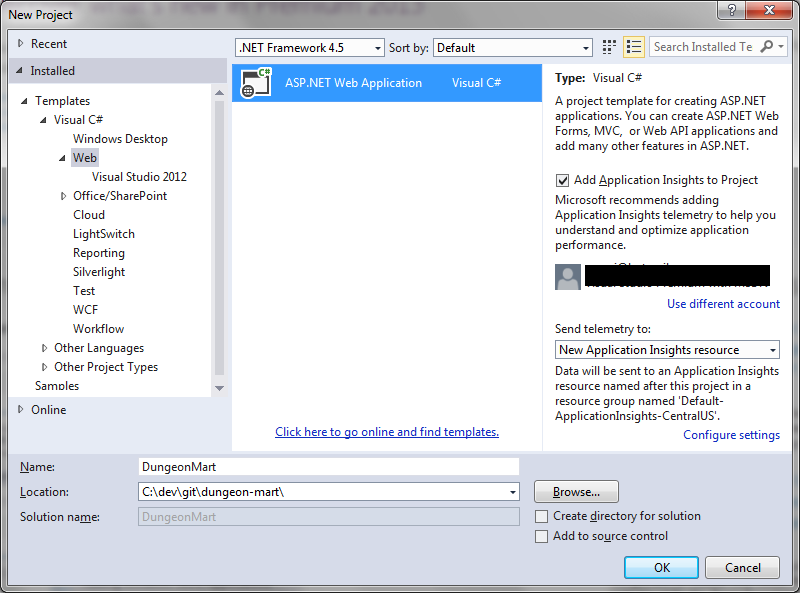
Create a new Web Application

This one looks simple, but there’s so much you can mess up here. Name and Location are important. You can move the whole solution if you don’t like the location, but changing the name is really annoying. I also like to uncheck “Create directory for solution” so I get a flatter folder structure, and I’m already in a source controlled folder so I’m not going to add source control again.

Remember, Templates are bad!
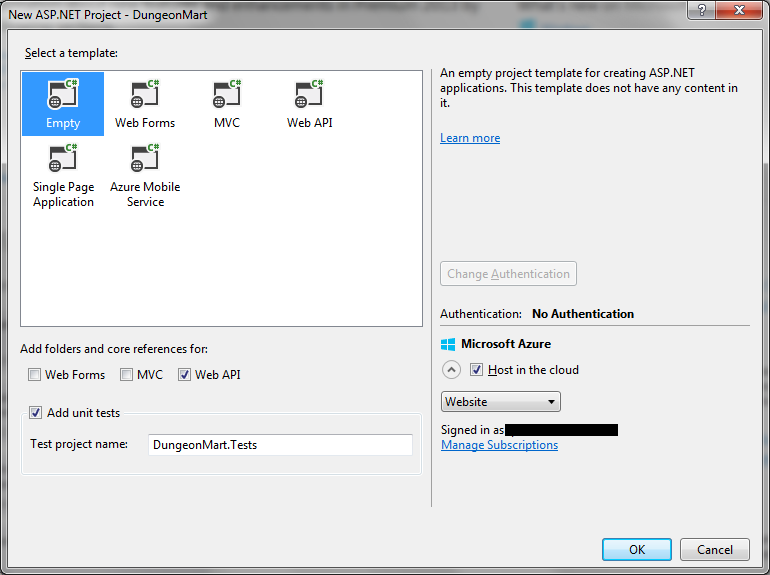
Select Template

These templates are where all the bloat that I hate so much comes from. So I always pick empty, and then add the core references I want using the checkboxes below the template list. Since the UI will be AngularJS, and not MVC with Razor, I did not choose the MVC checkbox.

I did check the unit tests box, but won’t be doing that again. In VS2012, it would put the unit test project folder in the same sub-folder as the main project folder, but VS2013 is placing the unit test project in the MyDocuments project path. So I had to remove the unit test project and create a new one to get it in the right folder.

If you choose to host in the cloud…
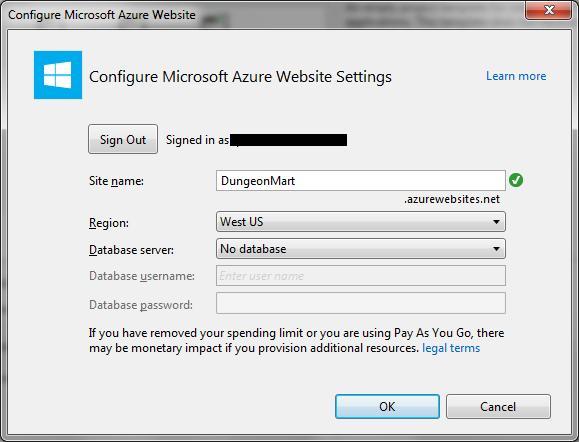
dmart3

… then make sure you pick the right name here. It’s one of those things that is really, really hard to change later.

What’s next?

Well, now you have an empty project waiting for you to add stuff. If you’ve used templates before, you’ll notice that a lot of things are missing: Areas, Scripts, Content, HomeController, four of the App_Start files, billions of Nuget dependencies, and so on. You have to add the things you’re going to want yourself, as you need them. Probably the first thing would be a start page, and then your first ApiController, but I’ll get into that next time.

Welcome to DungeonMart! Can I Interest You in a Longsword?

I need a web app, something with all kinds of webappy features that can serve as my go to project when I’m writing about different technologies. I’ve actually needed this for a while, but have been struggling to come up with the concept.

I tried for a content management system. Then I thought about a customer management system. I thought about building out that online retailer system that I dreamed up back when I was an Amazon/Ebay seller. The main thing lacking in all these was a mature domain model, due to my lack of experience with the subjects.

Then, in a completely unrelated-to-this-topic search, I stumbled upon a complete database of the D20 System Reference Document (SRD). You would probably know it as something else, but I’m not allowed to use that term. Anyway, it’s a database of character types, monsters, and items and equipment that can be used in various table-top gaming systems, like the kind where you poke around in dungeons and fight mighty dragons. This works out great for me, for a couple of reasons.

  1. The data set is very mature, having evolved from a system that was created in the 70’s.
  2. The SRD is open content. The license is full of all kinds of legalese, but I know from other sites that I can do what I need to do with it.
  3. The data is highly relational, but is represented in the database as unrelated tables. This gives me opportunity to model how one would refactor a site or a data model after the site has gone live, the whole changing-the-engines-while-in-flight problem.

Thus DungeonMart was born, a modern day e-commerce site where an adventurer could go to buy all the known adventuring equipment and items. It could be anything from a pound of wheat to a magical suit of chainmail. It’s nothing special yet, just a page that says Welcome. But as I evolve it over time, it should be pretty cool.

Technology wise, I’m first going to play around with getting the data into DocumentDB, while it’s still in preview on Azure and because I’m possibly going to be doing a session on DocumentDB at an upcoming event. Once the data is in place, I’ll probably progress to a Web API 2 RESTful service and then finally the actual web site part.

I’m sure I’ll get distracted many times on the way as I need to talk about one thing or another, but it will slowly come together. The source will be on my github the whole time, and the site will live on Azure probably for a while, here.

The Three Characteristics of Automated Tests That Actually Matter

Automated Tests are important. People know this. But do they really know what matters when it comes to automated testing?

Well, let’s think about it. What are we trying to accomplish with our automated tests? We’re trying to make sure that the software we just wrote functions and that we didn’t break any existing functionality. But we can do that with manual tests. So what makes automated tests special? The main thing that makes them special is they are automated.

Automated Tests Must Actually Be Automated

I know this seems obvious, but you’d be surprised how easy it is to get this one wrong. For example, one place I worked had a suite of automated tests that had to be manually deployed (by a person), started (by a person), and then monitored (again, by a person). Not very automated, after all.

Automated Tests Must Actually Test the Program

Code coverage and relevance are probably some of the hardest testing concepts to get right. Wanna know why? Because there’s not a definite right answer. The normal target number for code coverage is 80%, but if you’re writing tests just to cover lines and not actually exercise functionality then that number is meaningless. Relevance is more critical than coverage, but there’s no objective way to really measure it. Just making sure you have tests for all the requirements or acceptance criteria is probably a good place to start. After that, just target important sections and give them some extra love.

Automated Tests Must Be Deterministic

If one of your solutions to test failures is, ” run it again,” then you have a problem here. If I give the same test the same inputs, then i should get the same results every time. Automated tests should only fail because the code is bad, not because the tests are bad.

What About Unit vs. Non-unit Tests

Unit tests are good because it’s easy to make them fit all the criteria. But if you can have integrated tests or functional tests that fit the criteria, then use them. In fact, it would probably be a good strategy to mix them all in together. The more tests, the better. Don’t worry about whether or not you’ve truly isolated your test to a unit, worry instead that your code will work, and if it doesn’t then a test will tell you.

So, get out there and write some tests. Hopefully, they’re automated. But if not, write them anyway. Just write some.

The 10 Year Plan Is So Waterfall, Let’s Borrow From Agile

Are you struggling to make a long term plan? Me too. Or at least I was. I finally came to the conclusion that the 10 year plan isn’t natural, and that makes it hard to use. The gaps between goal periods are too long. You can spend a lot of time trying to figure out what can be accomplished in the 5-10 year gap. The plan is also too static, so it gets stale and has to be redone almost from scratch every year.

In my plan, I had such a hard time determining if something should be year 1 or year 5 that I had broken from the pattern and put in a year 2 category. This meant I had 1, 2, 5, and 10. While looking at my columns in Trello, I realized that I could add a 3, move the 10 to 8, and I would have a short Fibonacci sequence.

A Fib-o-what sequence?

In agile software development, we (meaning very smart people before me) discovered that it’s easier to measure the relative complexity of development tasks by using numbers from the Fibonacci sequence. If you’re new to this, the sequence starts with the numbers 1 and 2. After that, the next number is the sum of the previous two numbers. So, it goes 1, 2, 3, 5, 8, 13, and so on.

I thought if the sequence is so good for planning software, maybe I could adapt it to my long term plan. So, I did that and tried to rearrange my goals in that new structure. Not only did it work, it worked really well. And hence, this post.

Start with This Year

So, the first step is to start with what you want to accomplish This Year, or Year 1. Be realistic and know that it’s OK to start the planning after the year has started. Feel free to retroactively add a goal and mark it done. This is the easy column.

Then, look at Next Year

The next number in the sequence is 2. So make a new column and put your goals in it for next year. Be mindful of how much accomplishment you planned on accomplishing this year and be realistic about next year. It’s also good if you have one or two things that start soon, but are realistically year 2 goals. If it helps with the year 2 item to add some intermediate goal to year 1, then do it.

For example, if you wanted to learn electric guitar, it is a realistic goal that you could be at a level where you could play Hot for Teacher within 2 years, but probably not within the first year. In that case, add Hot for Teacher as a year 2 goal and Back in Black as a year 1 goal. If you can’t play Back in Black at the end of year 1, you probably won’t be ready for Hot for Teacher at the end of year 2.

Now for Year 3

Now it’s getting harder, but stick with me. Take the amount of accomplishment that you’ve now established can be done in one year, and add that to year 2 to create your year 3 goals. That’s the key part of the planning process. Add amounts of accomplishment you’ve already established to the last year to make the next year. It’s easy to know if you’re being realistic, because you have history. It’s future history, but you know what I mean. If you thought it would take two years to write a book, don’t put another book in year 3. However, it might be realistic to plan to be halfway done with the next book at year 3.

Rinse and Repeat

Ok, so you know how much can be accomplished in 2 years. And you know your year 3 goals. Add that level of accomplishment to year 3 and you have year 5. Add your year 3 accomplishment level to year 5 and you have year 8. If you really want, you can do that again for year 13. I really wouldn’t recommend going farther than that, but it’s your plan so do whatever works.

Twelve Months Later

Now for the second really good part of the Fibonacci plan. After the first year is over, go back to your plan and make some tweaks for a whole new plan. Rename year 1 to Last Year. Rename year 2 to year 1, year 3 to year 2, and add a new column for year 3. Take what wasn’t finished Last Year and move it to the new year 1. Now that you have an even more realistic view of what can be accomplished in a year, repeat the planning process to shuffle your goals and create new ones. If your book is still a realistic goal for the new year 1, a good goal for the new year 3 would be that second book.

Getting an Existing Database and Collection in DocumentDB

The API methods for creating databases and collections is easy to find, but how do you get a database and collection that’s already created? It’s definitely the more common use case, but it’s so obviously not there. Never fear, for we can wrap the queries used to get databases and collections in extension methods and pretend that it was always part of the API.

Did you say queries?

Yes, I did. You have to query the system database collection to get a link (not a URI, more like an ID) for your database, and ditto for your collection. The good news is that you don’t actually have to know where those collections live, because there are built in methods for querying them. It was almost easy.

First, get the Database

It’s kind of a two step process. Before you can get a collection, you have to get the database that contains that collection. But we’re going to make it easy with two simple extension methods. The first one will be used to get a Database object. You’ll rarely use this method directly, because the most common reason to get a Database object is to query it for the collection you need.

public static async Task<Database> GetOrCreateDatabaseAsync(
    this DocumentClient client, string databaseId)
{
    var databases = client.CreateDatabaseQuery()
        .Where(db => db.Id == databaseId).ToArray();

    if (databases.Any())
    {
        return databases.First();
    }

    return await client.CreateDatabaseAsync(
        new Database {Id = databaseId});
}

The method first tries to get the Database from the query. If it’s not found, then it creates the Database and returns it. I put the extension on DocumentClient because that is where CreateDatabaseAsync lives, so it made sense that the Get method would be, or appear to be, in the same place.

Then, get the collection

Now that we have a Database object, we can use its SelfLink to get the DocumentCollection. This extension method will be used a lot. It looks like this:

public static async Task<DocumentCollection>
    GetOrCreateDocumentCollectionAsync(
        this DocumentClient client,
        string databaseId,
        string collectionId)
{
    var database = await GetOrCreateDatabaseAsync(
        client, databaseId);

    var collections = client
        .CreateDocumentCollectionQuery(database.SelfLink)
        .Where(col => col.Id == collectionId).ToArray();

    if (collections.Any())
    {
        return collections.First();
    }

    return await client.CreateDocumentCollectionAsync(
        database.SelfLink,
        new DocumentCollection {Id = collectionId});
}

This works a lot like the other method, where it tries to get the collection and if it doesn’t exist then it creates the DocumentCollection and returns it. It also uses the other method to get the Database for its SelfLink. Note that this method asks for the database Id, not the object. I did that to make the two step process only look like one step from the outside.

Okay, now what?

This part’s easy. When you need a DocumentCollection object, just use the extension method. You’ll probably want to only do that once and store it in a static. We’re not going to put state in the DocumentCollection object, we really just want the DocumentLink. Here’s how you get it:

private const string DatabaseId = "ContentDB";
private const string CollectionId = "ContentCollection";
private static readonly DocumentCollection Collection =
    Client.GetDocumentCollection(DatabaseId, CollectionId).Result;

And then you use it for a document query like so:

public List<Content> GetList()
{
    var documentsLink = Collection.DocumentsLink;
    var contentList = _client
        .CreateDocumentQuery<Content>(documentsLink)
        .AsEnumerable().ToList();
    return contentList;
}

And that’s it, a very natural way to get the DocumentLink. Then again, maybe it makes sense to just store the DocumentLink as a static and just use that…

Consider that homework.